Editor Studio for Teachers: Fixing and Simplifying Scores for Students
Music teachers spend hours every week preparing repertoire: photocopying a page from a method book, simplifying a tricky left-hand stretch for a 9-year-old, transposing a vocal piece down a whole step, or hunting for an audio backing track so students know how the piece should sound at home.
With ScoreFlip + Editor Studio, you can do all of that in under two minutes right from your tablet, phone, or laptop.
ScoreFlip score viewer on tablet ready for lessons
1. Scan a page from any book in 5 seconds
Take a photo of the lesson piece (or import a PDF / MusicXML file). It opens immediately as a clean, playable digital score — no re-engraving from scratch.
2. Clean up or customize notes in Editor Studio
Tap Fix to open Editor Studio:
- Check bars automatically: Any bar with a scan rhythm hiccup glows orange. Tap Fix bar to repair it in one tap.
- Simplify a chord for small hands: Tap the extra note in a wide chord and hit 🗑 — it disappears cleanly while keeping the rest of the harmony intact.
- Transpose to a friendlier key: Open Song settings, shift the whole piece up or down by semitones, or adjust the tempo and title in plain English.
- Hear every change immediately: Every pitch tap plays out loud so you can check voicings right at the piano.
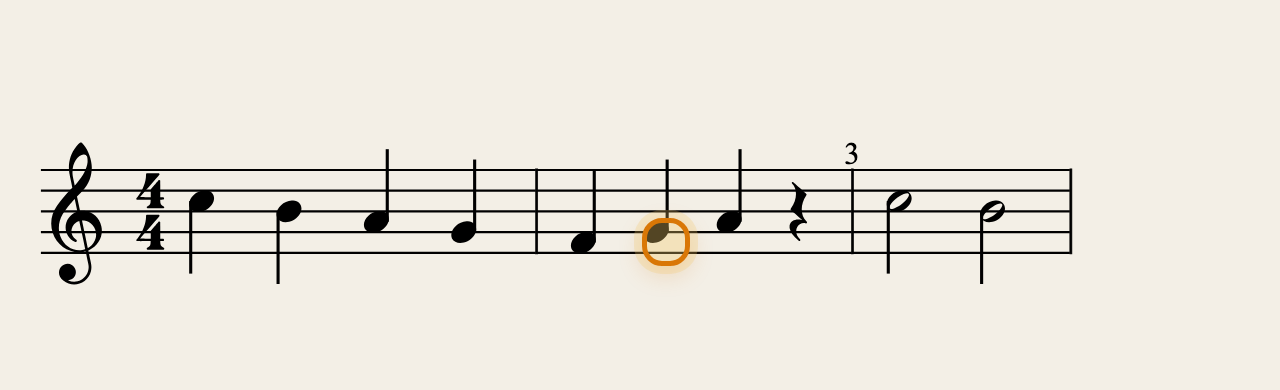 Fixing a note and verifying beats in Editor Studio
3. Switch difficulty levels in one tap
Need an easier version for a first-year student and the full arrangement for an advancing student? Toggle between Beginner, Intermediate, and Original right above the score.
4. Send a playable homework link
Tap Share to generate a playable web link and text or email it to the student or parent. They can open it on any device, press play to hear the exact tempo you set, slow it down to 60%, and practise along all week — no excuses about forgetting how the melody goes.
Enjoyed this deep dive?
Explore more articles on notation scanning, electric keyboards, and gamified music practice in our journal.
Explore All Articles