How to Fix Wrong Notes in a Scanned Score in 30 Seconds
Every sheet music scanner gets 95% of a clean page right — and then misses one sharp, reads a G as a B, or drops a rest in bar 12. Until now, fixing that single bar meant exporting MusicXML, opening a heavy desktop notation program, and hunting through menus.
That is why we built Editor Studio directly inside ScoreFlip — designed so simply that a 10-year-old can fix a score on their first try.
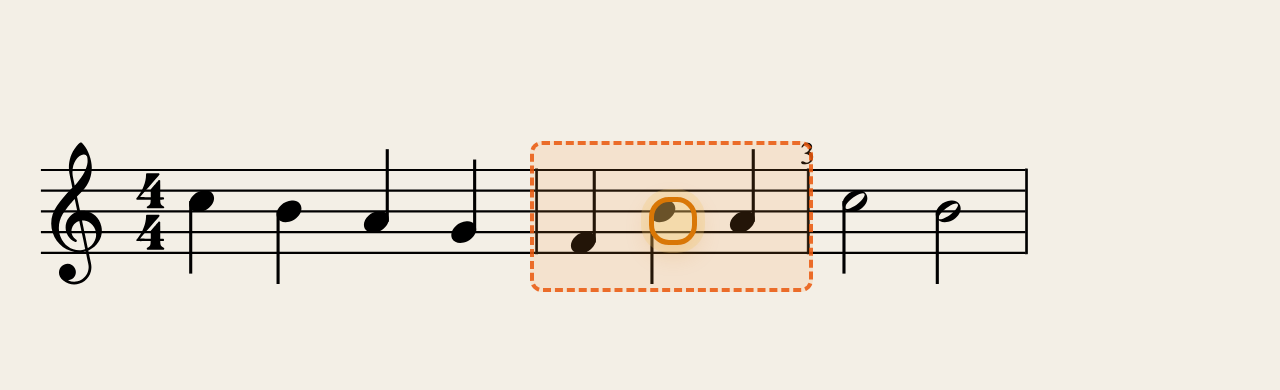
Editor Studio highlighting a bar with a wrong note and missing beat
1. Let ScoreFlip show you which bars to check
When you tap Fix in the score viewer, Editor Studio scans every measure in your piece and highlights any bar whose beats do not add up with a soft orange border.
Look at the top bar: if a scan dropped a beat, you will see a pill like "1 bar to check →". Tap it to jump straight to that bar without scrolling through pages of music.
2. Tap the note, use ▲ ▼, and hear it right away
Tap any note on the sheet and it lights up with an amber ring. A dock of big, friendly buttons slides up at the bottom:
- ▲ / ▼ moves the note up or down one step and plays the piano pitch on every tap so your ear confirms it immediately. Hold the arrow to jump an octave.
- ♯ / ♭ / ♮ toggles accidentals cleanly and updates the rest of the bar automatically.
- Visual note shapes (whole, half, quarter, eighth, sixteenth, and dot) change note lengths without music-theory jargon. When you shorten a note, ScoreFlip fills the gap with rests so the bar stays valid.
- ➕ turns a rest into a note, or splits a note in two. 🗑 removes a note from a chord or turns a single note into a rest.
3. Repair a broken bar in one tap
If a bar is missing a beat (or has too many), tap Fix bar right on the toolbar — or long-press any bar to open Bar Tools and tap Fix beats automatically. ScoreFlip pads short bars with the exact right rest or trims extra beats cleanly.
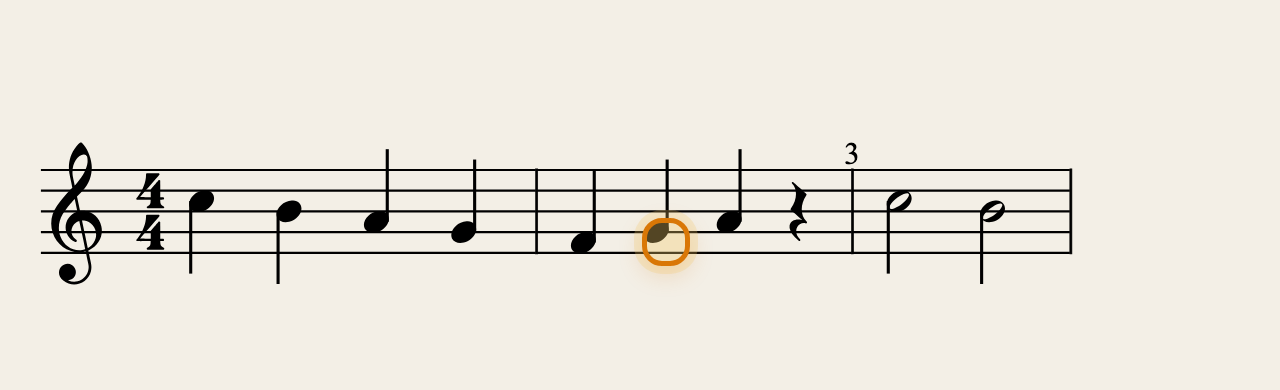 The same bar after fixing the pitch and filling the missing beat
4. Compare against your original scan photo
For new camera scans, tap the Original scan icon in the top bar to view your original photo side by side with the live score. Pinch to zoom in on a dense chord, fix the note underneath, and tap ▶ Play bar to verify it by ear.
5. Undo freely, save automatically
Every edit auto-saves to your library, Undo and Redo are always visible, and Restore original score is in the menu if you ever want to start fresh. Free accounts include 30 note fixes every month (and nudging the same note five times still counts as just 1 fix).
Enjoyed this deep dive?
Explore more articles on notation scanning, electric keyboards, and gamified music practice in our journal.
Explore All Articles